From Packet to Destination: The Journey of a Message Online
Packet to destination: follow how a message is divided, addressed, routed and reassembled, and see what each part can tell you about network traffic.
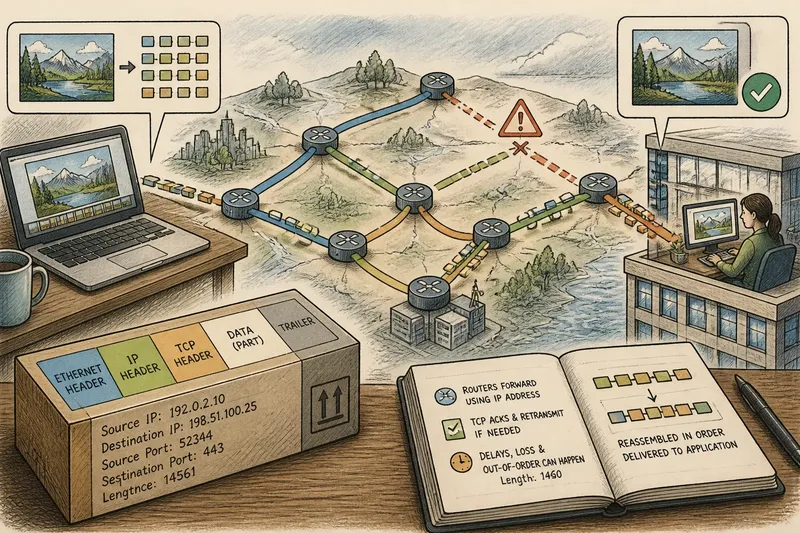
You send a photo to a friend, and the progress indicator pauses before catching up. The packet to destination journey is less like a sealed parcel on one lorry and more like a message split into labelled pieces, carried along changing routes, then put back together at the far end.
These field notes follow that journey. They focus on what packets do, what their labels mean, and why a network can carry one conversation by several different paths without turning it into several conversations.
One message, many packets
Applications work with useful units such as a photo, a web page or a voice call. Networks, however, move data in smaller chunks. The sending device divides a larger stream into packets so that links and routers can handle manageable pieces rather than wait for an entire file to arrive.
A packet commonly carries a portion of the data alongside information needed for delivery. The exact arrangement depends on the protocol and the network layer. Think of it as a small parcel with a bit of its contents and enough addressing context to keep it moving; it is not usually a miniature, self-explanatory copy of the whole message.
Packet boundaries are not the same as the boundaries a person sees in an application. A single image may occupy many packets, while a packet may contain only part of an application’s data. Nor does every application treat delays or missing pieces in the same way. A file transfer generally needs the data restored accurately; live audio may favour timely delivery over waiting for every late fragment.
Practical point: an application’s “message” and a network’s “packet” are different-sized ideas.
Addresses and delivery
Packets need addressing information to reach the right network endpoint. Internet Protocol (IP) addresses identify source and destination at the network layer. The address is useful to routers, which examine it to decide where to forward a packet next. It is not a complete description of the person, device or application behind it.
At the receiving device, a transport protocol such as TCP or UDP helps direct data towards the appropriate application service. Port numbers distinguish services on a device; they do not identify a physical socket or a person. TCP also provides mechanisms for ordered delivery and recovery when data is missing. UDP has a simpler delivery model and leaves more of that work to the application, if it is needed.
These roles are easy to blur because a packet can carry several layers of headers, each serving a different purpose. A router may use IP information to forward it while not interpreting the application’s message. The destination device, meanwhile, uses more of the layered information to decide where the arriving data belongs.
Practical point: an address answers a delivery question, not every question about who sent the data or what it contains.
Routes change in transit
A packet usually passes through routers between its source and destination. Each router examines relevant header information and forwards the packet towards another network. The route can depend on the network’s current routing information and conditions, so two packets from the same transfer need not pass through identical routers.
This is not a satnav trace printed on every packet. A router makes a local forwarding decision; it does not need a complete map of the packet’s entire journey. Network operators exchange and maintain routing information so that traffic can move between networks, but the visible path can vary with changes or failures along the way.
Imagine you send a large document from a laptop on a home network to a colleague’s work service. If a link on one route becomes unavailable, later packets may be forwarded along another available route. The colleague’s service can still receive the data, though the detour may add delay. This invented situation describes a possibility, not a report of a real transfer; the observable clue might be a pause followed by continued delivery, rather than a message revealing each router.
What happens to loss?
Packets can be delayed, discarded or arrive in a different order from the one in which they were sent. Congested links may have more traffic than they can forward at once, and devices may discard packets rather than hold them indefinitely. A receiver’s response depends on the transport protocol and the application.
With TCP, acknowledgements and retransmission mechanisms help recover data that has not arrived, while sequence information lets the receiver restore order. That recovery can add waiting: later data may be present but not yet usable by an application waiting for an earlier piece. UDP does not itself provide the same retransmission and ordering service. Applications using it can choose their own response, such as requesting missing data or accepting a brief gap.
“Packet loss” therefore does not always mean a whole message has vanished. It may mean the receiver has not yet obtained one piece, or that an application has decided a late piece is no longer useful. A video call and a document download have different priorities, even when both rely on packets.
Reassembly at the destination
At the destination, incoming data is matched to the relevant conversation and passed through protocol layers. Where the transport provides ordering and recovery, its mechanisms help present a usable stream to the application. The application then interprets that stream according to its own format and rules. Network delivery alone does not tell the application how to display a photograph or interpret a form submission.
That distinction matters when diagnosing a slow or incomplete result. A network can deliver data successfully while an application still waits for more, rejects malformed content or takes time to process it. Conversely, an application may conceal small network interruptions by buffering data before displaying or playing it.
For a reader, the visible outcome is usually simpler than the journey: a page loads, a file appears, or a call briefly stutters. Packet-level tools can expose more detail, but their captures show traffic at a particular observation point, not a complete account of every device and decision along the route.
Packet journey questions?
Does every packet take the same route?
No. Routing decisions can change, and packets from one transfer may cross different paths. The receiving protocols and application handle the resulting delivery rather than requiring a single fixed route.
Can routers read the message?
Routers use header information needed to forward traffic, but that does not mean they interpret the application’s content. Encryption can protect content in transit, though routing information still has to be available for delivery.
Why can a connection pause if later packets arrived?
An ordered stream may have to wait for an earlier missing piece before it can be presented in sequence. An application may also buffer data or need time to process what has arrived.
Can a packet reveal who sent a message?
Packet headers can expose network addresses and other technical details, but an address does not by itself identify a person. The meaning of visible information depends on the protocols, network and any encryption in use.
Reading the journey
The useful mental model is modest: packets carry portions of data with delivery information; routers forward them; transport protocols and applications manage what arrives and how it is used. Each layer answers a narrower question, and none should be mistaken for the whole story.
When a transfer stalls, note whether the symptom is a delay, a missing result or an application error before blaming the route. Packet to destination is a chain of distinct jobs, and the point where a message becomes useful is often beyond the last router.